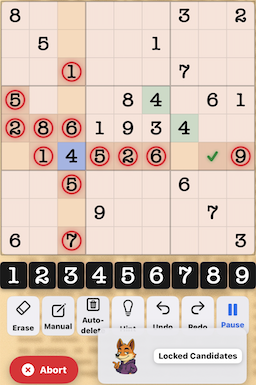
What are Locked Candidates?
Locked Candidates occur when a candidate within a box is restricted to a single row or column. This "locks" the candidate to that line, allowing eliminations in the rest of that row or column outside the box.
This technique comes in two forms: Pointing (box to line) and Claiming (line to box), both based on the same logical principle.
Two Types of Locked Candidates
Type 1: Pointing
A candidate in a box appears only in one row or column
Direction: Box → Line
Elimination: Remove from rest of that row/column
Type 2: Claiming
A candidate in a row/column appears only in one box
Direction: Line → Box
Elimination: Remove from rest of that box
Type 1: Pointing (Box to Line)
How to Find Pointing Candidates:
- Choose a box: Select any 3×3 box
- Pick a candidate: Choose a number that hasn't been placed in that box
- Check its positions: Where can this candidate appear within the box?
- Look for alignment: Are all positions in the same row or column?
- Make eliminations: Remove the candidate from that row/column OUTSIDE the box
Pointing Example
In Box 1, the candidate 7 can only appear in cells R1C2 and R1C3 (both in row 1).
Logic: Since 7 must go somewhere in Box 1, and it can only go in row 1, the 7 for Box 1 will be in row 1.
Elimination: Remove 7 from all other cells in row 1 (outside Box 1).
Type 2: Claiming (Line to Box)
How to Find Claiming Candidates:
- Choose a row or column: Select any line
- Pick a candidate: Choose a number that hasn't been placed in that line
- Check its positions: Where can this candidate appear in the line?
- Look for box confinement: Are all positions within the same box?
- Make eliminations: Remove the candidate from that box OUTSIDE the line
Claiming Example
In Row 5, the candidate 3 can only appear in cells R5C4 and R5C6 (both in Box 5).
Logic: Since 3 must go somewhere in row 5, and it can only go in Box 5, the 3 for row 5 will be in Box 5.
Elimination: Remove 3 from all other cells in Box 5 (outside row 5).
Why Locked Candidates Matter
- Bridge technique: Connects basic singles to advanced patterns
- High frequency: Appears in most medium and hard puzzles
- Powerful eliminations: Often unlocks multiple cells at once
- Foundation for fish: Understanding locked candidates helps with X-Wing and Swordfish
Common Patterns
Pointing Pair
Two cells in a box, same row/column, share a candidate that points outside
Pointing Triple
Three cells in a box, same row/column, share a candidate that points outside
Box/Line Reduction
Another name for Claiming – the line "claims" the candidate for its box intersection
Ready to Practice?
Download SudokuWorldTournament and master Locked Candidates!
Download Free on App Store